Changelog
What is new in Epicly: new campaign tools, improvements, and quality-of-life fixes for your table.
Feedback?
Questions, issues, suggestions, or feature ideas? Reach out anytime.
v1.18 - Automatic and manual AI images, campaign styles, and Energy
Two ways to generate campaign images: Codex can create wiki portraits automatically, and you can generate extra pictures yourself on wiki pages and session recaps. Campaign art styles and Energy (plus Potions) cover both.
New Features
- Automatic image generation - When Codex creates a new wiki page, Epicly can generate a matching portrait without you writing a prompt.
- Works in both auto and review wiki modes. In review, the portrait sits on the proposal until you approve.
- Uses the campaign art style and the new page's text. Charged to the campaign owner.
- Turn it on or off, and pick which wiki types get portraits (player characters, NPCs, locations, factions, items, quests, lore, custom), in Campaign settings → Images.
- Defaults: auto-generate on; player characters and NPCs on; other types off; look is Classic Fantasy Painterly.
- If Energy runs out mid-update, remaining portraits are skipped and Codex still finishes. GMs see a heads-up on the session page and in the review queue.
- Manual image generation - On a wiki page or session recap, anyone who can upload images can also tap Generate for an extra picture on demand.
- Write a prompt describing what you want. Optionally apply the campaign's default art style.
- On a wiki page only: Generate from wiki entry — Epicly writes the prompt from that page's text and the campaign art style, so you do not have to describe it yourself.
- Charged to you (the person who clicks Generate), not the campaign owner unless that's you.
- Available on live wiki pages and session recap galleries — not on pending review proposals, public pages, or the campaign Gallery tab.
- Campaign art styles - In Campaign settings → Images, pick a style preset (Classic Fantasy Painterly, Cartoon, Anime, Ink & Shadow, Storybook Watercolor, Comic / Graphic Novel) or write a custom style prompt. Automatic portraits always use it; manual generate can use it when you check the style option or choose Generate from wiki entry. Each campaign can look different.
- Energy - A new monthly allowance for AI images (automatic and manual). Shown next to sessions in Usage Overview. 10 Energy per standard image. Failed generations are not charged.
- Free: 5 images / month (50 Energy).
- Adventurer: 25 images / month (250 Energy).
- Guild: 50 images / month (500 Energy).
- Unused monthly Energy does not roll over. The meter resets with your other monthly limits.
- Energy Potions - Buy extra Energy that never expires, stacks, and is spent only after this month's included Energy is gone.
- Lesser Potion: 200 Energy (20 standard images) for $2.99.
- Greater Potion: 1,000 Energy (100 standard images) for $9.99.
- Available from Subscription → Add-ons, including on Free. Potion leftover shows as its own flask line under the Energy bar so it is never mixed with your monthly include.
- When monthly Energy and potions are both empty, the Images tab, Usage Overview, and dashboard (if any other limits are also empty) point you to potions or an upgrade. Audio sessions still use Session Packs, not Energy.
How to Use It
- Automatic: Turn Codex wiki updates on, then open Campaign settings → Images to confirm auto-generate, wiki types, and style. Process a session as usual — new wiki entries of the types you enabled get portraits while the owner has Energy left.
- Manual: Open a wiki page or session recap and use Generate. Type a prompt, or on a wiki page use Generate from wiki entry.
- More images: Buy an Energy Potion or wait for the monthly reset. Upgrade if you want a larger include every month.
v1.17 - Recap quote fixes and stronger length preferences
Quote blocks save correctly in session recaps, Memorable Quotes generate more reliably, and Concise, Balanced, and Detailed recap lengths now produce noticeably different amounts of content.
v1.16 - New recap voices: Gothic and Custom
Two new narrative voice options for recap customization on paid plans — The Gothic for horror and dark-fantasy tables, and Custom so you can write your own tone and style instructions per campaign.
v1.15 - Wiki links and relationship graph
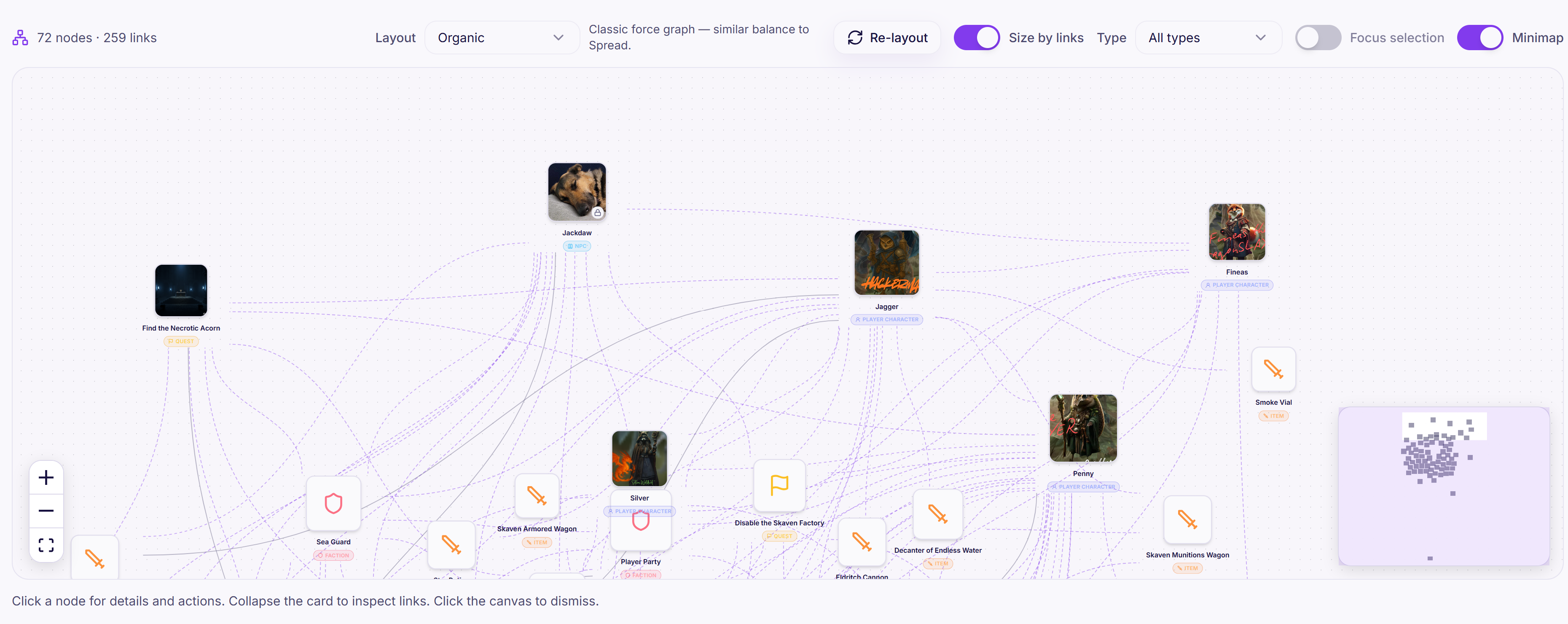
Wiki entries, plot overview, session recaps, and GM guides now link to each other automatically. Type @ while editing to add links with autocomplete, and explore your campaign world in a new Obsidian-style graph view.
v1.14 - Campaign comments, discussion threads, and comment emails
Discuss your games directly on session recaps, Codex, and public campaign hubs — with separate Party and Fans threads, likes, replies, pinned highlights, and new email controls for reply alerts and daily or weekly digests.
v1.13 - Player profiles, friends, and smarter campaign invites
Claim a username and share a public player profile, find friends across Epicly, get notified when someone sends a friend request, and invite players to campaigns from your friends list or by @username.
v1.12 - Public campaigns, Discover, and fan chat
Subscribed GMs can publish read-only campaign hubs for fans. Anyone can browse public campaigns on Discover, follow shows for episode emails, and chat with Lorekeeper on published campaign content.
v1.11 - Manual speaker remapping, PC wiki improvements, and fixes
Manually remap misidentified speakers in transcripts, with clearer separation from recap regeneration. PC wiki updates are more consistent and focused, plus auth, folder duplication, and Codex diff fixes.
v1.10 - Player achievements, recap revamp, and GM permissions
Session recaps get a visual overhaul with memorable quotes and party tiles, a new player achievement system links to wiki entries and profiles, GMs who are not the campaign creator now have full campaign access, and mobile session viewing is fixed.
v1.9 - Codex speed, upload gate, and reliability improvements
New sessions are blocked until pending wiki proposals are cleared, Codex runs are dramatically faster, and wiki updates are more resilient with better error handling.
v1.8 - Sign in with Google & Discord
Create an account or log in with Google or Discord. Campaign invites still link automatically when you use the same email.
v1.7 - Discord recap posts & paid player emails
Connect Discord for automatic recap posts, and email recaps to your whole party on any paid plan—not just Guild.
v1.6 - Public recap sharing links
Share a read-only recap link with your party—no Epicly account required. Turn it on from the session Share tab when the recap is ready.
v1.5 - Session Packs and gallery image reordering
Buy stackable Session Packs for extra audio sessions without changing your subscription, and reorder images in session and wiki galleries.
v1.4 - Find & replace, transcript correction rules, and text session changes
A new find and replace tool lands in the wiki editor and review queue, campaign-level transcript correction rules let you fix recurring spelling mistakes, and text sessions no longer count toward your monthly limit.
v1.3 - Multilingual support and wiki improvements
Epicly now supports 42 languages for transcription and content generation, with major improvements to wiki accuracy, consistency, and scalability.
v1.2 - New & improved campaign management
Create and Edit Campaign are now full pages with tabbed navigation, and Codex settings have been consolidated into Campaign settings.
v1.1 - Codex Proposal Queue Views and "Highlight Changes" mode
The wiki review queue now has a view selector with a new Highlight Changes mode, making it faster to review, approve, or tweak wiki proposals.
v1.0 - Epicly is officially out of early access!
Epicly has reached v1.0, completed the switchover, and now processes paid subscriptions through Stripe.
Changelog page and Chat interface polish
Epicly now has a public changelog page, cleaner Chat tool call display, and fewer early access notices.
Wiki folder movement and chat fixes
Bug fixes for wiki folder movement, long move menus, and chat reliability.
Guild tier email and recap updates
New Guild-tier controls for player recap emails, recap customization, and richer email previews.
Wiki trial, password reset, yearly plans, and mobile improvements
Free users now get a wiki trial run, password reset is live, yearly plans are available, and key mobile screens are easier to use.
Chat starter prompts, GM notes search, and mobile upgrades
Lorekeeper chat now has campaign-aware starter prompts, better mobile and desktop layouts, richer responses, and more polished interactions.
Epicly Assistant Chat
A new AI chat agent can answer questions using your campaign's sessions, wiki entries, plot overview, and campaign description.
Session processing, subscription, and Codex fixes
Processing is more resilient, subscription rollover is smoother, and several Codex and session management issues are fixed.
Player wiki editing permissions and quest tasks
Players can now be granted edit access to wiki content, quests have statuses and subtasks, and Codex tracking is smarter.
Session and wiki image galleries
Session recaps and wiki entries now support image galleries, the Codex has a Gallery tab, and duplicate entities are easier to merge.
Session emails and multi-track audio uploads
Session notification emails, multi-track audio uploads, and better wiki folder controls are now live.
Codex mega update
The biggest update since early access launch adds automated Codex updates, review mode, versions, wiki tools, security controls, and backfill support.
Notes uploads, auto-retry, attendance, and dynamic session numbers
Session processing now retries failed stages, notes-only sessions can generate full recaps, and session numbers are computed from session dates.
Attendance controls and player-friendly dashboard
Session uploads now support attendance customization, and players can more easily access campaigns and recaps they belong to.
Campaign invite and welcome emails
Adding player emails to a campaign now sends invite emails, links new accounts, and improves onboarding for DMs and players.